Interval Timer App for Workouts: How to Program HIIT, Tabata, EMOM, and Circuits

 Run these workouts on your iPhone, or hands-free on Apple Watch. Get PEAKVO2
 A good interval timer app removes the one thing that quietly wrecks most interval workouts: you, staring at a clock, deciding when each round ends. Once the app owns the timing, you own the effort. This guide covers what an interval timer app actually needs to do, the six features that separate a usable one from a frustrating one, and the exact setup to program HIIT, Tabata, EMOM, and circuit workouts so you can press start and stop counting in your head.
If you are brand new to this style of training, start with our interval training for beginners plan, then come back here to set up your timer.
What an Interval Timer App Actually Does
An interval timer app runs a repeating sequence of timed work and rest periods and signals you at every transition, so a workout structured as "20 seconds hard, 10 seconds easy, eight times" plays out on its own while you train. This is the fitness kind of interval timer, not the appliance kind that switches a lamp on at dusk or the hardware counter inside a computer. Same two words, completely different job.
The reason it matters is simple. Interval training only works if the intervals are honest. The whole point of high-intensity work is that the hard segments are genuinely hard and the recovery segments are genuinely the prescribed length. The moment you are responsible for watching the clock, two things happen: you shorten the work intervals when they hurt, and you stretch the rest intervals when you are tired. Both quietly drain the stimulus out of the session. The timer exists to take that decision away from a person who is, by design, uncomfortable.
The cardiovascular payoff is worth protecting. Structured interval training raises VO2 max faster than steady moderate exercise (Helgerud et al., 2007), and VO2 max is the single strongest predictor of long-term survival across large clinical cohorts (Mandsager et al., 2018). A timer that keeps your intervals accurate is the cheapest way to make sure the work you put in actually counts.
The 6 Features That Separate a Good Interval Timer App From a Bad One
Most interval timer apps look identical in a screenshot. The differences show up the moment you try to run a real workout. These are the six that matter.
1. Custom work and rest durations. Non-negotiable. If the app locks you into preset ratios, it cannot run the protocol you actually want. You need to set any number of seconds for work and any number for rest.
2. Rounds and sets, not just rounds. A flat "repeat 8 times" handles Tabata. Real training needs nesting: eight rounds of work, rest two minutes, then repeat the whole block three times. An app that only loops a single interval forces you to babysit the block breaks manually.
3. Named, sequenced intervals. A circuit is not one interval repeated. It is six different stations in order. The good apps let you build a named sequence (thrusters, rows, swings, squats, press, snatches) and cycle through it, so the screen tells you which movement is next instead of leaving you to remember.
4. Audio and haptic cues you do not have to look for. During a hard interval your eyes are not on the phone. You need a countdown beep into each transition and, ideally, a buzz on your wrist. If the only signal is a silent color change on a screen you cannot see, the app has failed at its one job.
5. Runs with the screen locked, in the background, over your music. A timer that pauses when the screen sleeps or stops your playlist to play a beep is unusable in practice. It has to keep counting with the phone in your pocket and duck your audio rather than kill it.
6. Apple Watch and heart rate. Timing intervals is the floor. The ceiling is training to heart rate, where the watch confirms your "hard" interval actually reached the zone that drives adaptation. This is the difference between guessing you trained hard and knowing it.
The free programmable interval timer on this site covers the first five in the browser with no signup. The PEAKVO2 app adds the sixth, with the workout landing on your Apple Watch and in Apple Health.
How to Program the 5 Most Common Workouts
Here is how to set up each of the workouts people actually search a timer for. Every one links to a pre-configured web timer you can run immediately, or the matching protocol in the PEAKVO2 app.
Tabata: 20 seconds on, 10 seconds off, 8 rounds
The original protocol from Tabata's 1996 study: 20 seconds at near-maximal effort, 10 seconds rest, eight rounds, four minutes total (Tabata et al., 1996). It is the most demanding four minutes in fitness and the most commonly mis-timed, because eyeballing a 10 second rest is exactly when people cheat.
| Setting | Value |
|---|---|
| Work | 20 sec |
| Rest | 10 sec |
| Rounds | 8 |
| Total | 4 min per block |
Open the Tabata Timer (pre-set to 20/10 for 8 rounds) or run the Tabata Protocol in the PEAKVO2 app. For the full background and exercise list, see our Tabata workouts guide.
Classic HIIT: 30 seconds work, 15 seconds rest
The everyday HIIT ratio. A 2:1 work-to-rest structure keeps the heart rate elevated through the short recoveries, which sustains cardiovascular load across the session. Ten rounds gives a clean block you can repeat once or twice.
| Setting | Value |
|---|---|
| Work | 30 sec |
| Rest | 15 sec |
| Rounds | 10 |
| Total | ~7.5 min per block |
Open the 30 Second Interval Timer. Pair it with our 15 best HIIT exercises to fill each work interval, or see HIIT workouts for fat loss for full sessions built on this ratio.
EMOM: every minute on the minute
EMOM means you start a fixed amount of work at the top of every minute, then rest whatever time is left until the next minute begins. Finish your reps in 40 seconds and you get 20 seconds of rest. Finish in 50 and you get 10. The clock is the entire structure, which is why a timer is mandatory: there is no workout without an audible signal at each minute mark.
To program an EMOM, you do not need a dedicated preset. Use the programmable interval timer and build a single 60 second work interval, set rounds to the number of minutes you want (10 to 20 is typical), and set a 3 second countdown so you hear each new minute coming. In the PEAKVO2 app, the same structure runs on your wrist with a haptic buzz at every minute, so you can keep your eyes off the phone entirely.
| Setting | Value |
|---|---|
| Work interval | 60 sec |
| Rest | none (built into the minute) |
| Rounds | 10 to 20 (one per minute) |
| Countdown | 3 sec |
Circuit: 45 seconds per station, 15 seconds transition
A circuit is several different movements in sequence rather than one exercise repeated. The 45/15 structure gives enough work time to accumulate real fatigue per station and just enough transition time to move to the next one. Run all stations as one round, rest a minute, repeat.
| Station | Work | Transition |
|---|---|---|
| 1 to 6 (different movement each) | 45 sec | 15 sec |
Open the HIIT Timer (pre-set to 45/15) and step through one station per work interval. For longer recoveries between rounds, our 1 minute interval timer works well as a block-break timer.
Norwegian 4x4: four 4-minute intervals
The protocol with the strongest VO2 max evidence behind it. Four intervals of four minutes at 90 to 95% of max heart rate, each followed by three minutes of active recovery (Helgerud et al., 2007). The long intervals make this the one workout where people most often lose track of time, because four minutes at high effort feels much longer than it is.
| Phase | Duration | Repeat |
|---|---|---|
| Work | 4 min | 4 intervals |
| Recovery | 3 min | between intervals |
Run the Norwegian 4x4 protocol in the PEAKVO2 app, which has the warm-up, work, recovery, and cooldown phases built in, or follow the full Norwegian 4x4 protocol and 8-week training plan guides.
Run Any of These on PEAKVO2 + Apple Watch
A web timer is enough to keep intervals honest. The PEAKVO2 app adds the layer a browser cannot: the workout runs natively on Apple Watch with continuous heart rate, so you can see whether your hard intervals actually reached the zone that matters.
Step 1: Pick the protocol
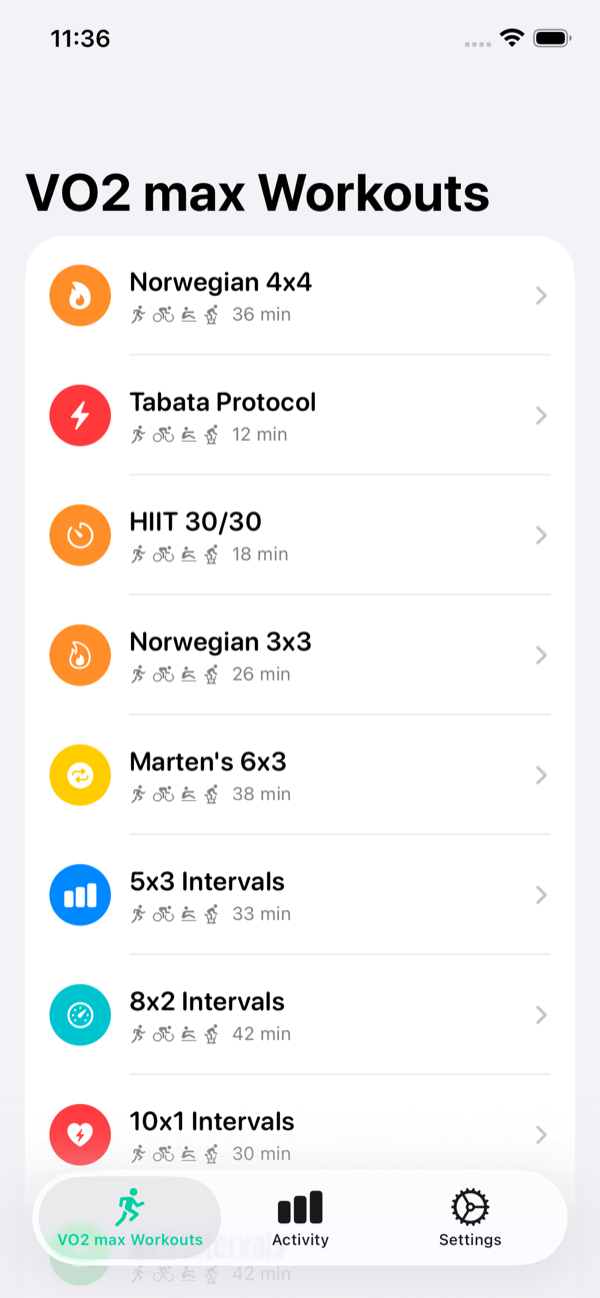
Open the Workouts tab. Tabata, HIIT 30/30, Norwegian 4x4, and the other protocols are ready to run. Tap the one you want.
Step 2: Send it to your wrist
With your Apple Watch paired, PEAKVO2 hands the session to the watch. The watch runs the interval pattern as a native workout, capturing heart rate from the optical sensor, calories, GPS when outdoors, and a record that saves to Apple Health on finish.
Step 3: Read the screen without reading numbers
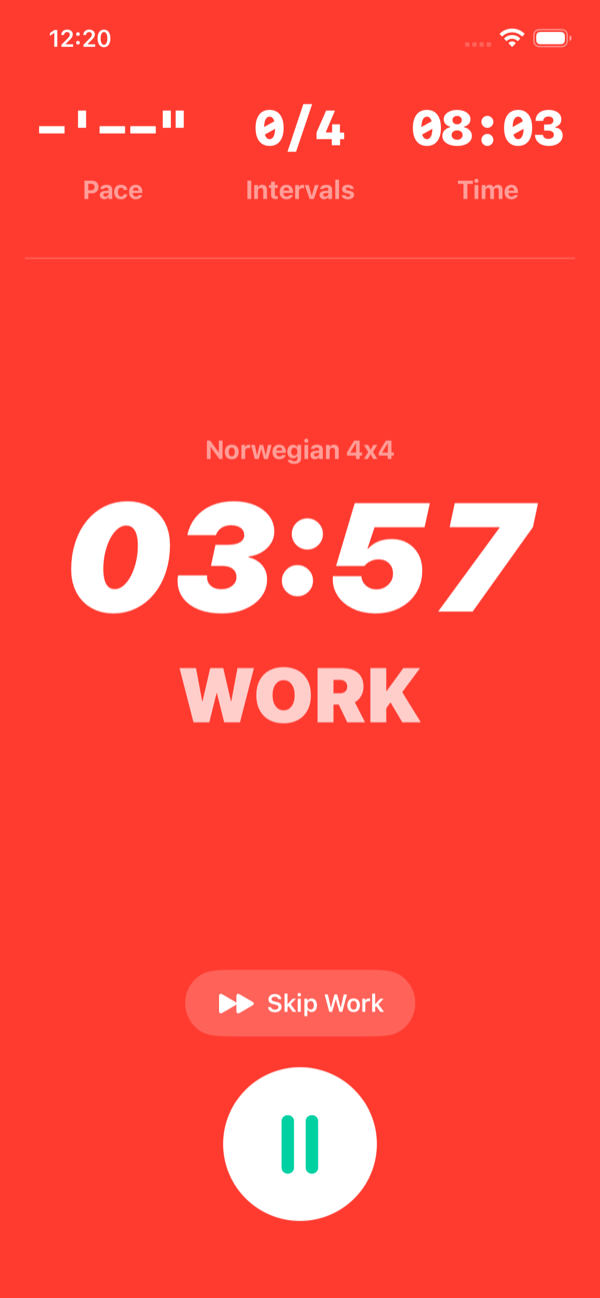
The phase color tells you what to do at a glance. Orange is warm-up, red is work, blue is recovery, green is cooldown. The countdown sits in the center, and a haptic alert fires on your wrist at every transition, so the phone can stay in your pocket.
Step 4: Watch the trend, not the session
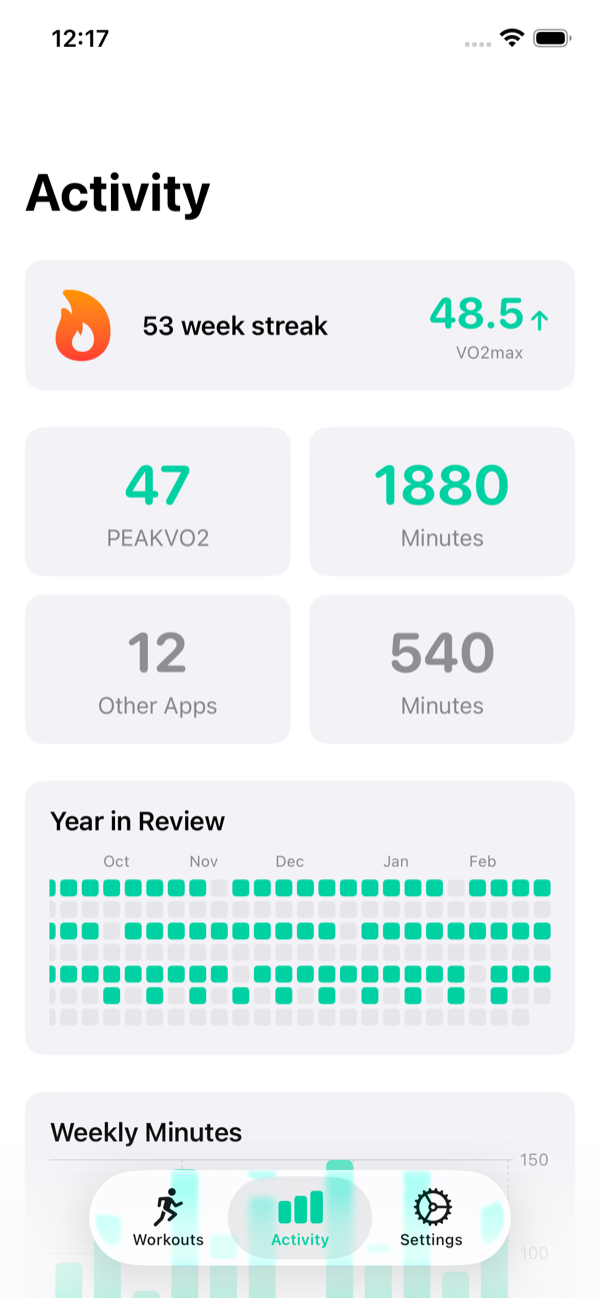
The Activity tab tracks your estimated VO2 max over weeks and months. Single sessions bounce around with sleep, stress, and fueling. The 4-week and 12-week trend lines are what tell you the training is working.
Interval Timer App vs Web Timer vs Kitchen Timer
You do not always need the app. Match the tool to the job.
| Tool | Good for | Falls short when |
|---|---|---|
| Kitchen or phone stopwatch | A single timed effort | You need repeating rounds or transition cues |
| Free web interval timer | Any structured interval workout at home or the gym, no install | You want heart rate or a wrist that buzzes |
| Interval timer app on Apple Watch | Training to heart rate zones, phone-free sessions, progress tracking | Never, for serious interval training |
The honest summary: a free web timer covers most people most of the time. The app earns its place the moment you care about whether your hard intervals are actually hard, which is exactly when heart rate stops being optional.
Common Mistakes With Interval Timer Apps
Programming work and rest backwards. It happens more than you would think. Double check the first transition beep lands where you expect before you commit to the session.
No countdown into transitions. A timer that switches silently leaves you reacting late every round. Set a 3 second countdown so each change is anticipated, not a surprise.
Letting rest creep. Apps that need a manual tap to advance each round defeat the purpose. Use one that auto-advances, so the rest interval is exactly as long as you set it and not a second more.
Timing without heart rate on the hard stuff. For Tabata, HIIT, and the Norwegian 4x4, the timer keeps the structure honest but only heart rate confirms the intensity. If you have a watch, use it. Build the aerobic base that supports those intervals with zone 2 training on your easy days.
PEAKVO2. The interval app for your cardio fitness.
PEAKVO2 runs Tabata, HIIT 30/30, Norwegian 4x4, and more directly on Apple Watch with continuous heart rate, color-coded phases, and haptic alerts at every transition.
Download PEAKVO2Frequently Asked Questions
What is the best interval timer app?
The best one is whichever one keeps your intervals honest without getting in your way: custom work and rest durations, nested rounds and sets, clear audio and haptic cues, reliable background and lock-screen operation, and Apple Watch heart rate if you train hard. PEAKVO2 covers all of these and runs natively on the watch. For browser-based use with no install, the free programmable interval timer on this site handles everything except heart rate.
Is there a free interval timer app?
Yes. The interval timers on this site, including the programmable interval timer, Tabata timer, and HIIT timer, are free in any browser with no signup and no ads.
Can an interval timer app run with the screen off and music playing?
A good one, yes. It should keep counting with the phone locked or in your pocket and duck your music to play a beep rather than stopping playback. If an app pauses when the screen sleeps or kills your audio, it is not built for real training. Apple Watch sidesteps the issue entirely by running the timer on your wrist.
What is an EMOM timer?
EMOM stands for every minute on the minute. You begin a set amount of work at the top of each minute and rest whatever time remains before the next minute starts. An EMOM timer is just an interval timer set to a repeating 60 second round with an audible cue at each minute. Program it with a single 60 second work interval and the number of rounds equal to the minutes you want to train.
Do I need an Apple Watch to use an interval timer app?
No. A phone or web interval timer runs any workout perfectly well by timing the intervals. The Apple Watch matters when you want to train to heart rate zones rather than time alone, keep the phone in your pocket, and have sessions sync to Apple Health. For HIIT, Tabata, and the Norwegian 4x4, heart rate is what confirms your hard intervals reached the intensity that drives adaptation.
Can I use an interval timer app for things other than workouts?
Yes. The same structure of timed work and rest periods applies to stretching and mobility circuits, focused work sprints, and breathing routines. Any activity built on repeating timed segments runs on the same programmable timer.
Keep Reading
- Interval Training for Beginners: A Simple Starter Plan
- Tabata Workouts: Origins, Science, and 6 Workout Examples
- 15 Best Exercises for HIIT Workouts
- Norwegian 4x4 Protocol: The Most Studied VO2 Max Workout
- Zone 2 Training: The Foundation of Endurance Fitness
- Free Programmable Interval Timer
References
- Helgerud J, Hoydal K, Wang E, et al. Aerobic high-intensity intervals improve VO2max more than moderate training. Med Sci Sports Exerc. 2007;39(4):665-671. PubMed
- Tabata I, Nishimura K, Kouzaki M, et al. Effects of moderate-intensity endurance and high-intensity intermittent training on anaerobic capacity and VO2max. Med Sci Sports Exerc. 1996;28(10):1327-1330. PubMed
- Mandsager K, Harb S, Cremer P, et al. Association of cardiorespiratory fitness with long-term mortality among adults undergoing exercise treadmill testing. JAMA Netw Open. 2018;1(6):e183605. PubMed