The Norwegian 4x4 App: Run the Protocol Without Watching a Clock

 Run these workouts on your iPhone, or hands-free on Apple Watch. Get PEAKVO2
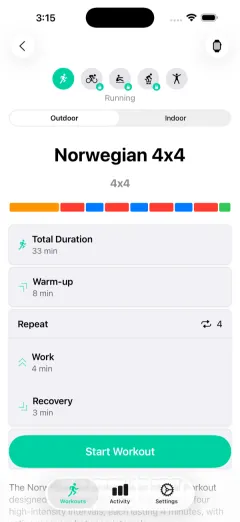
PEAKVO2 is the app that runs the Norwegian 4x4 for you on iPhone and Apple Watch. It counts every 4-minute work interval and 3-minute recovery, shows the target heart rate zone (90 to 95 percent of max for the work, 60 to 70 percent for recovery), and taps your wrist at each switch, with warm-up and cool-down built in. Start it and just run or ride.
The Norwegian 4x4 is simple to describe and hard to run cleanly by hand: four four-minute intervals near your max, each followed by three minutes easy. The moment you are counting minutes and reading your heart rate off a watch face mid-effort, you are managing the clock instead of training. An app that runs the protocol removes that.
What the Norwegian 4x4 Is
Four intervals of four minutes at 90 to 95 percent of your maximum heart rate, each separated by three minutes of easy active recovery, bookended by a warm-up and cool-down. It is the most research-backed interval protocol for raising VO2 max. For the full science, timing, and heart rate detail, see our complete Norwegian 4x4 guide.
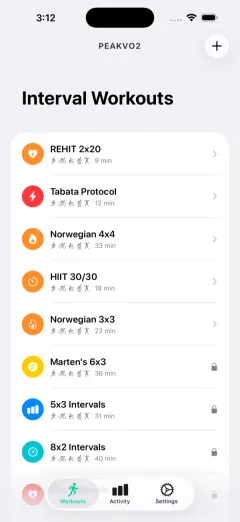

Improve your VO2 max
Get PEAKVO2 freeWhat the App Does for You
- Counts the intervals and recoveries. Every 4-minute work bout and 3-minute recovery is timed automatically, so you never track minutes yourself.
- Holds you to the zones. It shows the target heart rate zone for each phase, the thing the protocol depends on, so you can tell if you are working hard enough or recovering easily enough.
- Taps at every switch. A haptic cue and a full-screen color change tell you to go hard or ease off without looking at the screen.
- Runs on the wrist. The protocol runs on Apple Watch with no phone needed, or on iPhone if you prefer.
- Tracks the payoff. It logs your VO2 max trend over time so you can see the protocol working across the weeks.
How to Start
- Open PEAKVO2 and pick the Norwegian 4x4.
- Put the phone on the handlebars or wear the watch, and start the guided warm-up.
- When the screen turns to the work phase, go hard until it switches you to recovery. Repeat four times.
- Follow the plan two to three times a week. For a structured build, use our week-by-week Norwegian 4x4 plan.
Keep Reading
- Norwegian 4x4 Protocol: Proven HIIT to Raise VO2 Max
- Norwegian 4x4 Training Plan: Week-by-Week Guide
- The Apple Watch Interval Training App Built Around VO2 Max
- How to Improve Your VO2 Max
Frequently Asked Questions
What app should I use for Norwegian 4x4 workouts?
PEAKVO2 is built for it. It has the Norwegian 4x4 as a ready-to-run protocol on iPhone and Apple Watch: it counts each 4-minute work interval and 3-minute recovery, shows the target heart rate zone, and taps your wrist at every transition, with warm-up and cool-down built in, so you just run or ride.
Does the Norwegian 4x4 app run on Apple Watch?
Yes. PEAKVO2 runs the Norwegian 4x4 directly on Apple Watch with no phone needed, showing full-screen color-coded phases and giving a haptic tap when it is time to switch between the hard interval and recovery.
Is there a free way to do the Norwegian 4x4 in the app?
Yes. PEAKVO2 includes 4 free workouts, and the Norwegian 4x4 is one of the protocols you can run. You can start the full protocol without paying and unlock the rest of the library later.
Can beginners use the Norwegian 4x4 app?
Yes, though beginners should build up first. The protocol's intensity is set by percentage of your max heart rate, so it scales to your fitness, and the app handles all the timing. Start with an easier interval session for a few weeks, then progress to the full four intervals.